WatermarkRemover
Pricing
WatermarkRemover

Fast, simple watermark removal for cleaner files and smoother creative workflows.

Product

  • Image Watermark Remover
  • Video Watermark Remover

Account

  • Login
  • Sign up

Company

  • Contact
  • Privacy Policy
  • Terms of Service

© 2026 WatermarkRemover.tech. All rights reserved.

Free Video Watermark Remover

Clean up videos in-browser. Remove distracting marks and download instantly—no complex editing suite required.

Image
Video

Or drag a video here to start

Remove Watermark from Video Instantly

Don't let distracting logos, text, or overlays ruin your footage. Our browser-based video watermark remover lets you clean up any clip seamlessly. Just upload, mark the area, and download. No software to install, no editing skills required.

Try It Now — It's Free
BeforeAfter

Erase Any Unwanted Object from Your Videos

From brand logos to social media overlays—clear away any distractions in seconds. Our video watermark remover is designed for quick, everyday edits without relying on complex software.

Remove Brand Logos

Remove visible logo marks that sit on top of the frame so the clip looks less distracting and easier to reuse in a new setting. This is especially useful when an old export or sourced clip still carries a fixed corner logo.


Before and after: brand logo removed from video frame corner, clean background restored
BeforeAfter

Clear Text Overlays

Take out text that blocks the scene or clashes with your own message. An AI-powered video watermark remover is a practical option when you need a cleaner version for presentations, reposts, or internal use.

Before and after: text overlay cleared from video scene, frame fully restored
BeforeAfter

Erase Stickers and Graphic Overlays

Clean up stickers, badges, and other graphic overlays that draw attention away from the video itself. This helps when decorative elements feel unnecessary or no longer fit the way you want to use the clip.

Before and after: sticker and graphic overlay erased from video clip
BeforeAfter

Remove Timestamps and Date Marks

Remove time and date stamps when they make the footage look older, messier, or less flexible for reuse. A cleaner frame gives you more room to adapt the video for different channels or audiences.

Before and after: date and time stamp removed from video footage
BeforeAfter

Clean Up Social Media Watermarks

Remove platform-style marks and repost overlays when you want a less cluttered clip. Using a dedicated video watermark remover makes repurposing footage across channels much easier while keeping the frame focused.

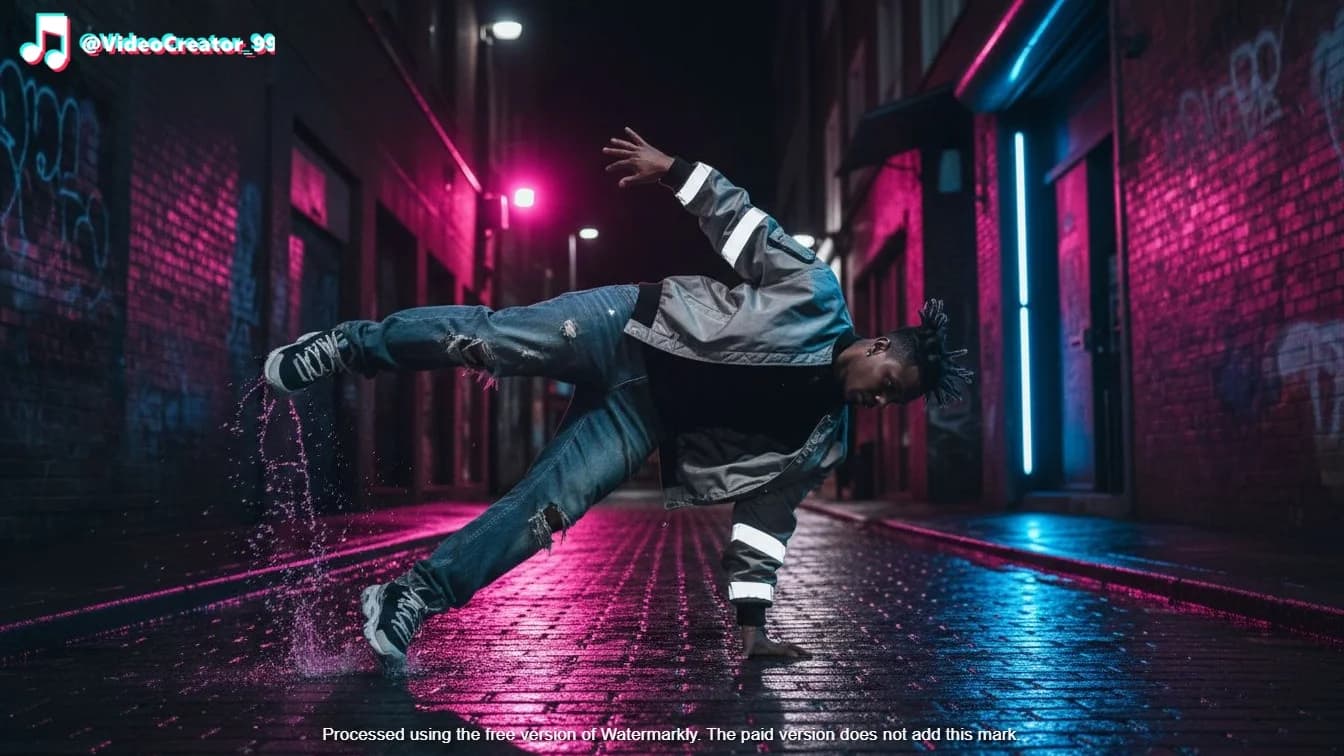
Before and after: social media watermark and repost overlay removed from video frame
BeforeAfter
Clean Up Your Video Now

How to Remove a Watermark From Video

Using our video watermark remover stays straightforward: upload the file, mark the area you want cleaned up, let the AI process it, and review the result.

1

Upload Your Video

Add your file in a few clicks and start with the clip you want to clean up. Common formats such as MP4, MOV, M4V, and AVI fit typical use cases.

2

Mark the Watermark Area

Select the part of the frame that contains the logo, text, timestamp, or overlay so the tool knows what needs attention.

3

Process the Video

Submit the clip, and let our video watermark remover handle the complex cleanup step seamlessly, without sending you through a longer editing workflow.

4

Review and Download

Check the result, make sure the cleaned version looks right for your use case, and download the video when you are ready.

Why Creators Choose Our Video Watermark Remover

Skip the complex editing software. Get fast, private, and effortless video cleanup straight from your browser.

Faster for Small Edits

When you only need to erase one distracting mark, an online video watermark remover is often much faster and easier than opening a heavy editing suite.

No Extra Software to Install

Everything happens online, so you can start from the browser instead of downloading another app for a one-time cleanup job.

Easier to Use Without an Account

No login requirement keeps the process lighter, especially when you just want to upload a clip, remove the mark, and download it.

Better for Everyday Formats

Support for widely used video file types helps you work with clips you already have instead of converting them first.

Cleaner Output for Reuse

The goal is simple: make the video easier to share, present, or repurpose by reducing visual distractions in the frame.

A More Practical Privacy-Friendly Flow

For quick edits, many people prefer an online workflow that avoids extra installs and does not ask for account setup just to get started.

FAQs

Our video watermark remover AI can seamlessly erase logos, text overlays, stickers, social media watermarks, and timestamps.

Not at all. Whether you are removing a tiny logo or a massive text block, our AI reconstructs the background without compressing or degrading your original video quality.

We support all universally used video formats, including MP4, MOV, M4V, and AVI. You can upload and process your footage directly.

No. Our video watermark remover is 100% browser-based. You don't need to download any heavy software, install plugins, or even create an account to get started.

Yes, your absolute privacy is guaranteed. All uploaded files are securely processed and automatically deleted from our servers immediately after you finish.

Processing is typically completed in seconds. Our AI is fully optimized to deliver clean results instantly, even for high-resolution footage.

Absolutely. Our platform is fully responsive, allowing you to clean up clips directly from your iPhone or Android browser without downloading any apps.

No. Our video watermark remover exclusively targets the visual pixels you select. Your original soundtrack, voiceovers, and background audio remain completely untouched and perfectly synced.

Yes. Social media overlays are one of the most common issues we solve. Our video watermark remover easily erases bouncing TikTok logos or fixed Instagram handles so you can freely repurpose your content.

Short clips and medium-length videos process incredibly fast. While our video watermark remover handles larger, high-resolution files without issue, please note they will naturally take a bit longer to upload and process.

Erase Any Video Watermark in Seconds

Remove Watermark from Video